Github Repository to PDF Generator
Project Overview
This project is a command-line tool that converts GitHub repositories into professionally formatted PDF documents. It is designed to create readable, structured, and portable snapshots of entire codebases for purposes such as code reviews, documentation, offline reading, and long-term archiving. The tool focuses on intelligent file selection, robust encoding handling, and high-quality PDF layout, turning raw repository contents into a clean, human-readable document without manual intervention.
Problem Addressed
Sharing or reviewing a complete codebase often requires cloning repositories, navigating complex directory structures, or relying on online access.
This tool solves that problem by generating a single, well-formatted PDF that preserves the structure, hierarchy, and content of a repository in an offline-friendly format.
Core Workflow
The application follows a clear, multi-phase pipeline:
- Repository Selection
- Scans a local directory for existing repositories
- Allows cloning new repositories directly from GitHub URLs
- Validates repository structure before processing
- Scope Selection
- Option to process the entire repository or specific subdirectories
- Recursive traversal with intelligent exclusion rules
- Automatically ignores irrelevant directories such as
node_modules,.git, and build artifacts
- File Discovery & Filtering
- Recursively scans directories to collect files
- Uses a whitelist-based extension system supporting 20+ languages
- Skips minified files and large binaries
- Applies size-based rules:
- Large files are truncated with clear visual warnings
- Line limits prevent unreadable output
PDF Generation Pipeline
- Generates a structured PDF using PDFKit
- Includes:
- Title page with repository metadata
- ASCII-style directory tree visualization
- Hierarchical grouping by top-level folders
- Line-numbered source code blocks
- Automatic pagination with header preservation
- Carefully designed typography ensures readability:
- Monospace fonts for code
- Consistent spacing and margins
- Clear visual separators between sections
Intelligent File Handling
- Robust encoding strategy:
- Primary UTF-8 decoding
- Fallback to Latin-1 when necessary
- BOM removal and control character sanitization
- Special handling for:
- Extremely large files
- Long source files
- Unsupported or malformed content
- Ensures PDF compatibility by filtering problematic characters such as emojis when required
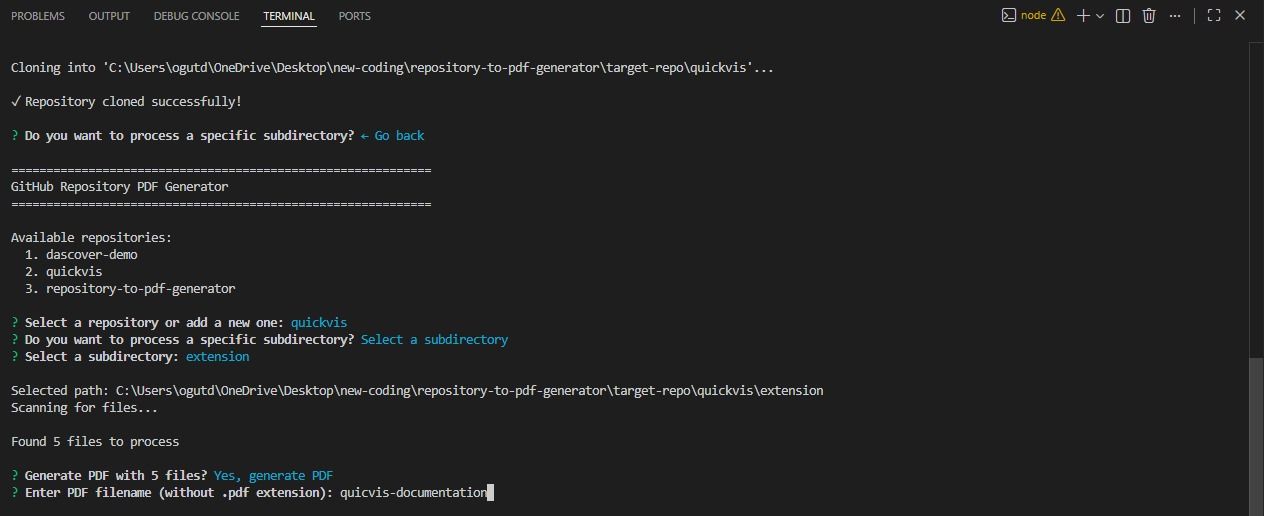
User Experience (CLI)
- Interactive command-line interface built with Inquirer.js
- Step-by-step guided flow with:
- Repository selection menus
- Subdirectory picking
- PDF naming customization
- Confirmation prompts before generation
- Real-time feedback:
- Clone progress
- File counts and size summaries
- Clear success and error messages
Architecture & Design
- Modular Node.js architecture with clear separation of concerns:
- Repository handling
- File scanning and filtering
- Directory tree generation
- PDF rendering
- Cross-platform compatibility via normalized path handling
- Designed for extensibility:
- New file types can be added easily
- Formatting rules are centralized and configurable
Why This Project Matters
This project demonstrates:
- Strong understanding of file systems and recursive algorithms
- Practical CLI UX design
- Robust handling of real-world data inconsistencies
- Attention to detail in document layout and formatting
- Ability to turn developer tooling into a polished, production-ready utility